
Quick answer
To grow your business using Facebook Groups, join or create groups where your target customers already discuss relevant problems, contribute helpful posts, listen to recurring questions, build a clear content routine, and use a responsible workflow for posting, tracking, and follow-up.
Facebook Groups can support business growth through community, customer learning, support, local trust, and useful discussion. That does not mean posting the same promotion everywhere.
The businesses that get value from groups usually do three things well: they choose the right groups, they contribute useful context, and they keep a repeatable workflow for posts, comments, feedback, and follow-up.
Contents
Start by choosing the right group types
Different groups support different business goals. A local group may help a service business become known in a city. A customer group may reduce support friction and collect product feedback. A professional group may help a consultant or software company earn trust through expertise.
If you need a deeper breakdown, read the companion guide: What Types of Facebook Groups Exist?. It explains public, private, visible, hidden, local, customer, marketplace, professional, learning, event, and internal groups in more detail.
For business growth, match the group to the job:
- Local visibility: local community groups, neighborhood groups, and event groups.
- Customer retention: customer groups, support groups, and education groups.
- Authority building: professional, industry, founder, creator, or niche expert groups.
- Product learning: customer feedback groups, beta groups, and private member communities.
- Offers and listings: marketplace-style groups, when rules clearly allow it.
Build trust before asking for attention
Groups are conversation spaces. A business that only arrives to promote usually looks out of place.
Start by observing. Look at repeated questions, common objections, language members use, pinned rules, admin posts, and which posts receive thoughtful replies.
Then contribute without immediately selling. Answer questions. Share checklists. Explain mistakes to avoid. Compare options. Give examples. When a link or offer is relevant, make the context clear and follow the rules.
Use groups for customer research
Facebook Groups can show what customers actually care about. Pay attention to:
- repeated questions;
- objections and frustrations;
- product requests;
- local needs;
- language customers use to describe the problem;
- competitor mentions;
- common misunderstandings.
This research can improve landing pages, product features, support articles, onboarding emails, and future posts.
Create useful post formats
Business posts work better when they are useful even before someone clicks.
| Post format | Best use | Responsible-use note |
|---|---|---|
| How-to post | Teaching a useful step or solving a common problem | Keep it specific and avoid exaggerated claims |
| Checklist | Helping members make a decision or avoid mistakes | Make the advice useful without requiring a click |
| Local update | Service businesses, events, openings, deadlines | Include location context and follow local group rules |
| Customer question answer | Support, education, objection handling | Answer honestly and disclose business relevance when needed |
| Offer or listing | Marketplace-style groups or groups that allow promotions | Follow format, frequency, price, and location rules |
Each format should match the group. A local group needs local context. A professional group needs substance. A customer group needs clarity and support.
Turn posting into a workflow
If you post regularly, do not rely on memory. Build a simple workflow:
- Keep a list of relevant groups and rule notes.
- Decide the goal of the post: awareness, feedback, support, event attendance, or direct offer.
- Write one base draft.
- Create variations for different audiences.
- Review each group before posting.
- Track posted, pending, skipped, removed, and needs follow-up.
- Return to comments and questions.
This is where AI Groups Poster becomes useful. Group Collections keep selected groups organized. AI Post Rewriter helps create editable variations. Schedule Posting helps plan routines. Smart Posting Controls help pace the workflow.
Create your own Facebook Group when you can sustain it
Creating a business-owned group can work when the group gives members a reason to return. Good reasons include customer education, peer support, product feedback, exclusive updates, challenges, workshops, or a focused niche conversation.
Do not start a group if the only plan is to repost ads. A group needs moderation, prompts, answers, rules, and consistency.
Measure quality, not only size
Growth from Facebook Groups is not only member count or post frequency. Better signals include useful comments, answered questions, saved posts, referrals, support issues reduced, feedback that improves the product, event signups, qualified conversations, and customers who mention the group during sales or support.
Avoid assuming that a certain number of posts will produce guaranteed leads. Groups are relationship channels, not vending machines.
Where AI Groups Poster fits
AI Groups Poster is built for businesses and creators that already have a responsible Facebook group posting workflow and want less repetitive manual work.
- Organize relevant groups into reusable collections.
- Prepare different versions of a post for different group types.
- Schedule planned posting workflows.
- Use intervals and pacing controls.
- Keep review before continuing.
- Reduce copy-paste mistakes.
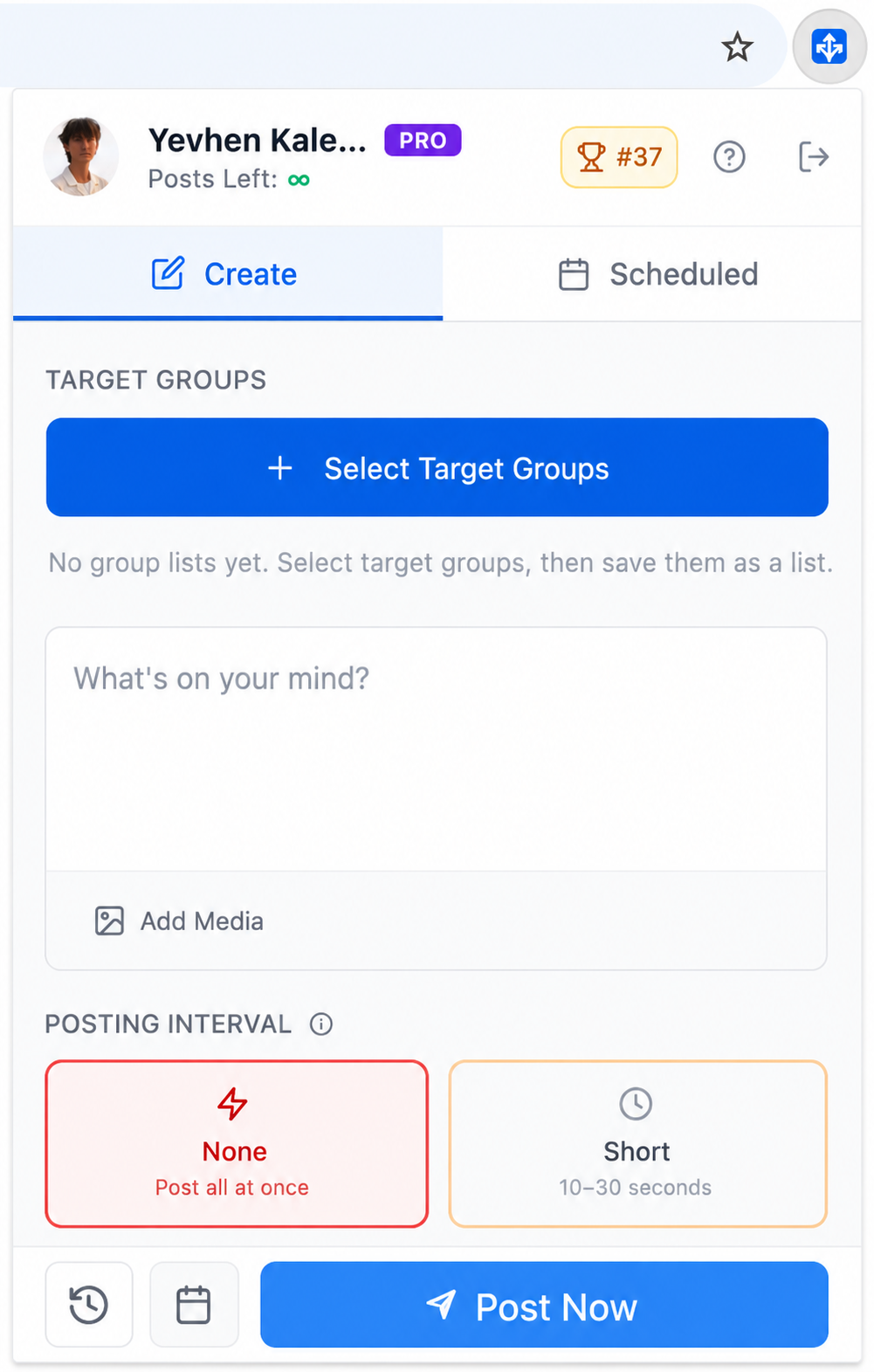
Use it with judgment. AI Groups Poster does not guarantee reach, approvals, leads, engagement, or account standing. It helps with preparation, organization, review, scheduling, and posting controls.
Responsible business growth in groups
- Choose groups where your business topic is relevant.
- Follow group rules for links, offers, frequency, and format.
- Contribute useful answers, not only promotional posts.
- Review every post variation before using it.
- Track follow-up and respond when people engage.
Common questions
Can Facebook Groups really help a small business grow?
Yes, when the business participates in relevant groups and contributes useful discussion. Groups can support awareness, customer research, feedback, support, and local trust. They are less useful when treated as places to drop repeated promotions.
Should I join existing groups or create my own?
Both can work. Existing groups help you learn the market and meet people where conversations already happen. Your own group gives you more control, but it requires ongoing moderation and value.
How often should a business post in Facebook Groups?
There is no universal schedule. Follow group rules, watch member response, and prioritize quality. If a group has strict promotion rules or low relevance, post less or skip it.
How can AI Groups Poster help with business growth?
It helps with the operational side: group collections, editable post variations, planned workflows, and pacing controls. The strategy still comes from choosing relevant groups, writing useful posts, responding to people, and following rules.
Final thoughts
Facebook Groups can support business growth when they are used for community, learning, trust, and useful communication. The strongest results usually come from relevance and consistency, not from posting the same message everywhere.
Once you know which groups matter and what value you can contribute, AI Groups Poster can help turn that routine into a cleaner workflow with organized groups, reviewed variations, scheduling, pacing, and follow-up.